AI phone assistant
The call you can't take — taken.
Skaala is an AI phone assistant that answers on your own number around the clock, understands what the caller wants, books the appointment, and only calls you when it truly matters.
7-day free trial · Cancel anytime
Call answered
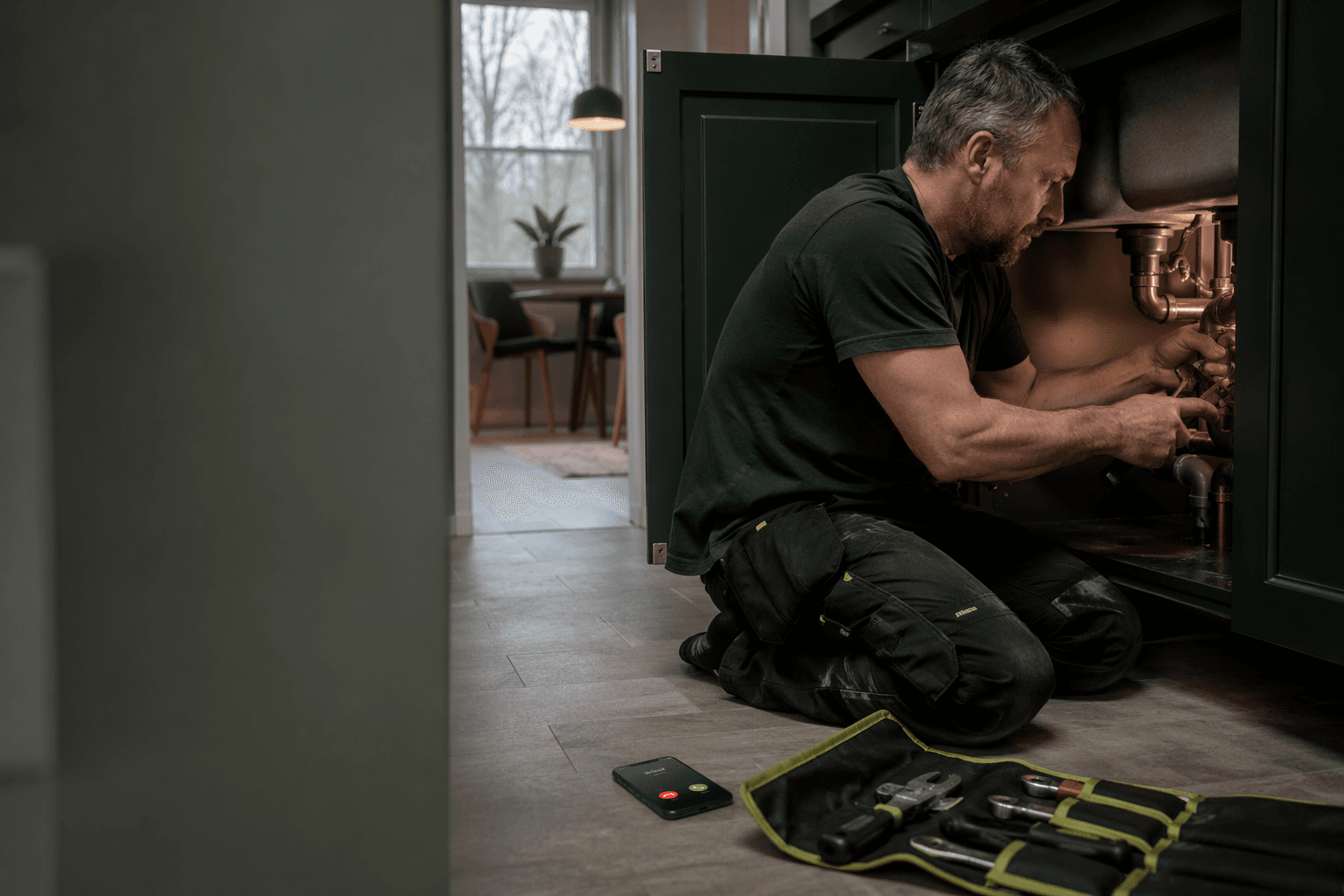
- 1:42 PMIncoming
Unknown number — you're under a sink
- Skaala answers
Asks for name, address, and how urgent it is
- Burst pipe, downtown
Flagged urgent
- 1:43 PMSMS to John
With address and context
The short answer
An AI phone assistant answers the phone when you can't.
An AI phone assistant is a voice AI that takes inbound calls for your business. Unlike voicemail, which just plays a recording, it holds a real conversation: it greets, understands what the caller wants, books the appointment, and hands off to you when needed. The caller gets helped — not recorded.
What happens when the phone rings
From a call you can't reach to a booked appointment.
Every call follows the same structure, but the AI adapts to what's said.
- 01
Answers
Skaala answers with your greeting on your own number, day or night.
ON YOUR NUMBER · 24/7
- 02
Asks
Captures name, reason, address, and how urgent it is.
Name · Reason · Urgent?
- 03
Decides
Books the time, answers the question, or hands off to you.
IF urgent → call you
- 04
Acts
Sends an SMS confirmation and updates your calendar.
Booked Tuesday 2:30 PM
- 05
Summarizes
You get the useful version of the call, not a missed number.
CRM updated · SMS sent
This is what an answered call becomes
You get the context — not a number on the screen.
Peter called while you were on a job. Skaala answered, found an open slot with the right colleague, and booked it. You watched the booking land in your calendar without lifting a finger.
Call answered · 1:42 PM
Peter Lind
Wants to book physio next week
- Service
- Physiotherapy (45 min)
- Colleague
- Lisa
- Booked
- Thursday 2:00 PM
- Urgency
- Normal
Summary in CRM · SMS confirmation sent
Sent to your CRM while the caller was still on the line.
How a call sounds
Welcome to Clinic North. You're speaking with our AI receptionist Ellen. How can I help?
Hi, I was wondering if I could get an appointment with the physio next week.
Happy to help. Have you been to us before?
Yes, my name is Peter Lind.
Lovely, Peter. I see you saw Lisa last in March. She has Thursday at 2 PM next week — does that work?
Thursday at 2 PM works.
I've booked you Thursday at 2 PM with Lisa. You'll get an SMS confirmation now and a reminder 24 hours before. Anything else?
Real calls, handled while you work
The calls that come in when nobody can reach the phone.
These are the calls a plumber misses every week — caught one by one.
- Tuesday 11:20 AMMid-job
Burst pipe in a downtown basement, water rising.
Skaala — Answers, captures the address and severity, flags the call urgent, and rings you with the context.
You take the call with the address ready — not a missed number on the screen.
- Wednesday 4:05 PMPricing question
What does it cost to replace a mixer tap?
Skaala — Answers from your price list, gives a range, and offers a slot for a quote.
The question answered without you putting the tools down.
- Thursday 9:30 AMReschedule
Needs to move tomorrow's visit to next week.
Skaala — Finds the booking, suggests a new time, and updates the calendar.
The calendar is right — no double booking, no voicemail to call back.
- Sunday 9:30 PMAfter hours
Broken water heater, no hot shower tomorrow.
Skaala — Answers while you sleep, judges it can wait, and books a slot Monday 8:00 AM.
You wake up to a booked morning, not a lost customer.
The honest part
What it handles — and when it hands off to you.
Skaala handles the predictable work reliably. When a call is unusual, or the caller asks for a person, it hands off to you with the context already captured. You approve the rules it works from.
Handles reliably
- Opening hours and price list
- Simple bookings and reschedules
- Capturing an urgent call with the address
- After-hours calls
- Recognizing a returning customer
Hands off to you
- Unusual or sensitive cases
- When someone asks for a person
- Judgment calls only you can make
- Anything you haven't approved
Compare the alternatives
AI phone assistant vs voicemail and answering services.
How the agent on the line differs from voicemail, an IVR keypad menu, and a staffed answering service.
| Category | Voicemail / answering service | Skaala |
|---|---|---|
| Answers around the clock | Only business hours | Yes — day and night |
| Understands free speech | IVR needs keypad input | Yes — free speech |
| Books in the call | Manual, needs follow-up | Yes — straight to calendar |
| Recognizes customers | No — everyone treated alike | Yes — pulls the record |
| Price (low volume) | $300–$800/mo staffed | From $29/month |
| Languages | One | 70+ languages |
Everything about the AI phone assistant
How the agent on the line actually works.
The term "phone assistant" covers everything from keypad menus to receptionists for hire. Here's what an AI phone assistant is, who it's for, and what it does with a call.
What is an AI phone assistant?
An AI phone assistant is a voice-based AI agent that handles inbound phone calls in real time. Unlike a traditional voicemail, which only plays a recorded message, the AI phone assistant carries a real conversation: it listens, understands natural speech, answers questions, pulls context from the contact card, and performs concrete actions like booking an appointment or sending an SMS confirmation.
The term "phone assistant" has been used for everything from simple keypad menus (IVR) to human receptionists for hire. When we talk about an AI phone assistant we mean something specific: a software agent driven by large language models and natural voice synthesis (in Skaala's case ElevenLabs), able to hold an open conversation without a script and without sending the caller through a keypad tree.
The AI phone assistant is one of three overlapping roles in Skaala. The AI receptionist is the broader role — it covers the calendar, contact record, and follow-up. The AI switchboard (sentralbord, växel) is the telephony category you replace when you move off a traditional PBX. The AI phone assistant is the agent on the line that actually takes the call and talks with the caller.
Booking directly in the call
The AI phone assistant books in Google Calendar or Microsoft Outlook during the call. It sees which slots are free with the right staff member, accounts for the service duration, and offers alternatives in natural language.
Once booked, the AI sends an SMS confirmation immediately with date, time, location, and staff name. A reminder is sent automatically 24 hours before. Industry data typically shows a 20–40% reduction in no-shows when SMS reminders are configured.
Cancellation and rescheduling work the same way: the caller calls in, the AI finds the booking, confirms the change, and updates the calendar — without anyone having to log in.
Handoff to a human teammate
You describe the rules in plain English: "If the caller is an existing client and it's urgent, connect them to Hannah. If it's a press enquiry, take a message and send a summary to management." The AI translates that into call routing immediately — no consultant required to change the rules.
When the AI hands off, it does so with context: the teammate who takes over gets a short note (push or SMS) with the caller's name, what the call has been about, and what's been tried. The human picks up where the AI stopped — not from the beginning.
If no one is available, or the phone rings outside business hours, the AI can do one of three things based on your rules: take a detailed message and send a summary, book a callback for the next business day, or resolve the request itself if it's something simple (hours, price list, a general question).
Privacy, GDPR, and data storage
Skaala processes personal data in line with GDPR. You as the customer are the data controller, Skaala is the data processor, and a data processing agreement (DPA) is signed at onboarding. The DPA and privacy policy are available at /en/legal/dpa and /en/legal/privacy.
Call data is processed primarily in EU regions with our subprocessors. Recordings and transcripts are stored for as long as you have an active subscription, with a deletion window you configure yourself. You can export or delete an individual customer's data directly from the dashboard.
Skaala does not require specific industry certifications like SOC 2 or HIPAA today, and we don't claim them. For dentists, doctors, and physiotherapists we recommend you run your own risk assessment before the AI is given access to patient data.
What Skaala does NOT do
The AI phone assistant is powerful but not all-knowing. It does not replace a doctor or lawyer — it triages, refers, and documents, but it does not make medical or legal judgments.
We don't make outbound sales calls on your behalf. Skaala is an inbound phone assistant — it takes calls, it doesn't dial out to sell. If your need is outbound cold calling, Skaala isn't the right tool.
We don't currently support in-call payment signing through region-specific bank ID schemes. If those are critical requirements for your industry, talk to us before signing up — we're honest about what we support and what's on the roadmap.
Read on
The AI phone assistant is part of a broader business AI for small businesses. These pages go deeper on related features, industries, and comparisons:
- What is an AI receptionist?The broader role the phone assistant is part of — calendar, contact record, and follow-up.
- PricingEssential, Business, and what's included per plan.
- Glossary: AI phone assistantA short definition and related concepts (note: glossary slug is Norwegian).
- AI for dental clinicsEmergency booking, triage, cancellations, and patient handling.
- AI for hair salonsCut appointments, evening booking, and fewer no-shows.
Frequently asked questions
What's the difference between an AI phone assistant and an AI receptionist?
The AI phone assistant is the agent on the line — it listens, understands, answers, and hands off. The AI receptionist is the broader role around it: calendar, CRM, follow-up. In practice the terms are used interchangeably, and with Skaala you get both in the same subscription.
Can the AI really hold a conversation?
Yes. The voice is powered by ElevenLabs and the AI is tuned per language. Callers hear a polite, natural conversation aimed at resolving the request — not a read-out script. You can listen to recordings from real calls during the trial before you decide.
What happens if the AI doesn't understand the caller?
The AI is trained to know what it doesn't know. If the caller asks about something outside the knowledge base, if the mood turns frustrated, or if the case escalates, it hands off to a human teammate with context. You set the rules and can adjust them directly from the dashboard.
Do I get my own phone number?
Yes. A local phone number is included in the subscription — one number per business on both Essential and Business. You can keep your existing number by forwarding it to the Skaala number, or publish the new number as your official one.
What does an AI phone assistant cost?
Essential is $29/month and includes 50 minutes of AI calling. Business is $149/month and includes 400 minutes. Both plans include a 7-day free trial, and you can cancel anytime. Additional minutes are billed per minute beyond the included quota.
Can the AI book in Google Calendar and Outlook?
Yes. Booking in Google Calendar and Microsoft Outlook is built in. The AI checks available slots with the right staff member, accounts for service duration, and sends an SMS confirmation immediately. Cancellation and rescheduling work the same way.
Does it speak languages other than English?
Yes — 70+ languages. The AI detects the language automatically in the first seconds of the call and continues in that language, so a tourist who doesn't speak the local language still gets helped.
How long does setup take?
AI-guided onboarding starts from your website: we read the site, suggest services, hours, and a greeting, and you adjust what you want. Most businesses are live the same day. You can keep tuning the AI from the dashboard.
Can it make outbound sales calls?
No. Skaala is an inbound AI phone assistant — it takes calls, it doesn't dial out to sell. It can, however, call out to confirm a booking or follow up with an existing customer where that's configured as part of the workflow.
How does GDPR work?
Skaala is the data processor, you are the controller. A DPA is signed at start. Call data is handled primarily in EU regions. You can export or delete an individual customer's data directly from the dashboard.
Last updated:
Let Skaala take the next call.
AI phone assistant, booking, CRM, and a local number — live in a day. Test real scenarios in a 7-day trial.
7-day free trial · Payment method required · Cancel anytime